With ID scanning on, an alcohol sale can't be paid until a license is scanned — every check is logged, and a failed one is added to Refused Sales automatically.
A step-by-step walkthrough with real screenshots · FoolProof POS for alcohol retail
Steps
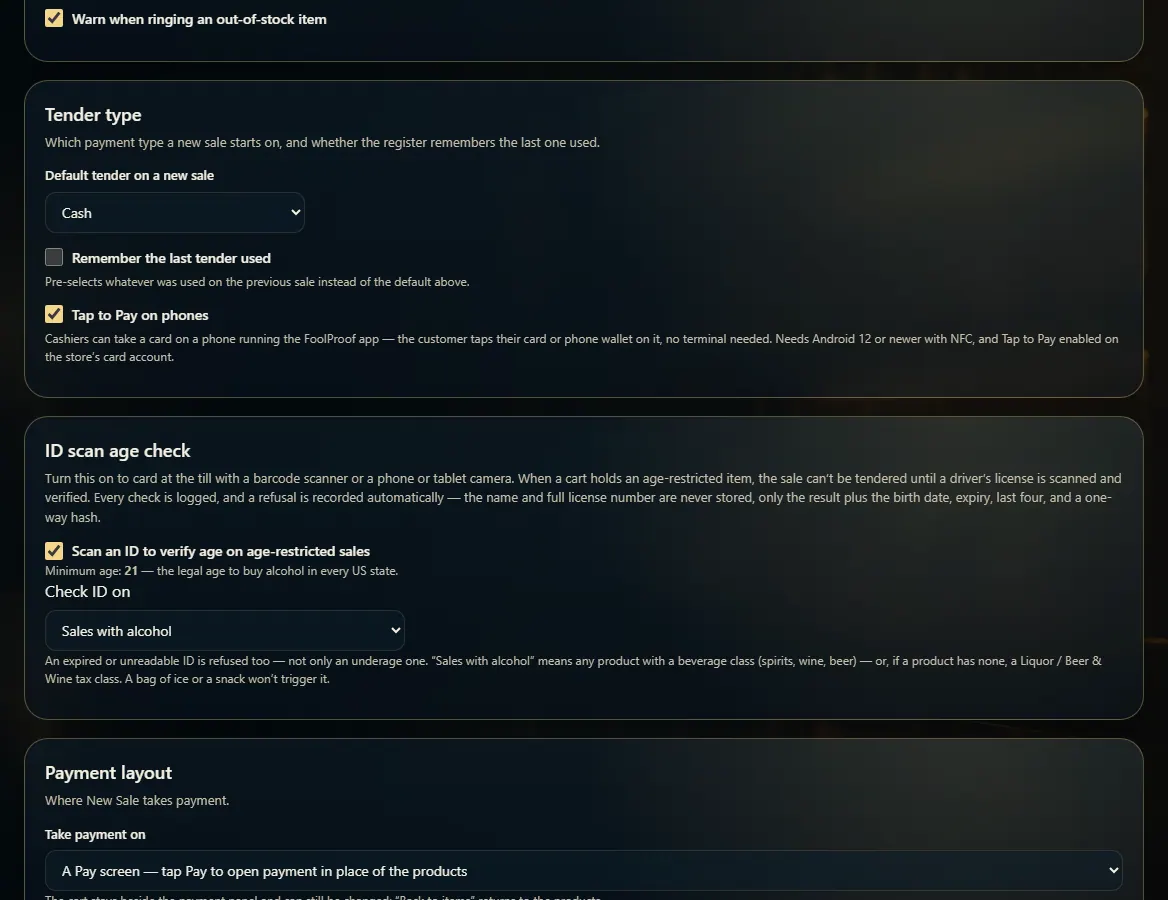
Open Admin → New Sale settings and find ID scan age check.
Tick Scan an ID to verify age on age-restricted sales.
Under Check ID on, choose Sales with alcohol or Every sale.
At the register, the cashier scans the back of the license when asked, with a barcode scanner or by holding it up to the phone or tablet camera, which reads the barcode live.
A pass lets the sale continue. An underage, expired, or unreadable ID is refused and logged on Refused Sales, marked AUTO.
Under Barcode format checks, choose Block, Flag only, or Off. FoolProof checks that the barcode is built like a real license: its header, that the issuer number belongs to the state on the card, the license number's shape, and dates that make sense. Block refuses an ID that fails; Flag only notes it on the check and lets the sale go on.
Tick Lock out an ID after repeated failed checks, then set Failures before lockout, Within (hours), and Locked for (minutes).
Good to know
The minimum age is always 21 — it can't be changed.
Only the result, birth date, expiry, last four digits, and a one-way code are kept. The customer's name and full license number are never stored.
Refused someone without scanning, or for another reason? Log it yourself on Refused Sales.
Every check, passed or failed, is listed on ID Checks. A check can't be edited or deleted — not even directly in the database. The only changes ever made to one are noting which sale or pickup used it and a one-time security upgrade of its one-way code.
In Alabama, ID scanning is on by default for a store that hasn't chosen — you can still switch it off.
In Alabama, barcode format checks are set to Block for a store that hasn't chosen. The same checks run on pickups, online sign-up and the driver's ID check at the door. A check FoolProof can't apply to a state is skipped, never held against the customer.
The lockout counts an ID that was read and refused — under 21, expired, failed format checks, or a photo that didn't match — at any FoolProof store. An ID that couldn't be read, or one entered by hand, doesn't count. A locked-out ID is refused and logged on Refused Sales as Repeated failed ID checks.
A license that any FoolProof store refused as under 21 can't be used to sign up online until that person turns 21.
A product that isn't alcohol but may not be sold to anyone under 21 (a home-brew kit, for example) is carded too once you tick 21+ (check ID) on it in the product editor — at the register, offline, and when a pickup is handed over without its alcohol.
A passport, military ID, or an ID that won't scan can be entered by hand: tap Enter ID by hand, pick the ID type, type the birth date and expiry, and confirm the photo is the customer. FoolProof checks the age and logs it like a scan. Only roles with Enter an ID by hand see the button.
Hemp, tobacco, vapes and nicotine always need an ID check, even with scanning off or set to alcohol only — see Regulated products.
1. Turn on ID scanning
These settings live under Admin → New Sale settings. Changes save as soon as you make them.
 12
12