Record every alcohol sale you turn away on Refused Sales — the log is your record if a sale is ever questioned (dram-shop / liability).
A step-by-step walkthrough with real screenshots · FoolProof POS for alcohol retail
Steps
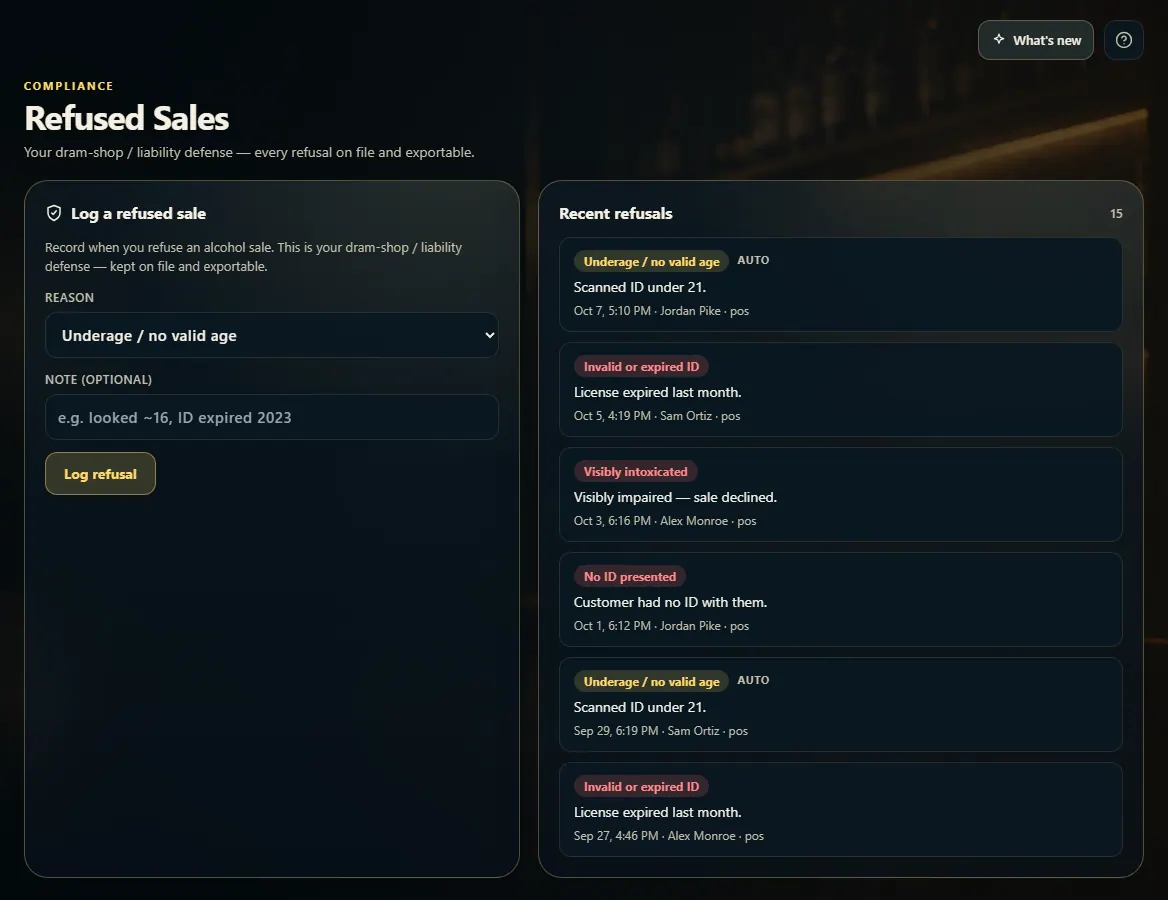
Open Refused Sales from the menu.
Pick a Reason: Underage / no valid age, Visibly intoxicated, Over the legal quantity limit, Invalid or expired ID, No ID presented, or Other.
Add a note if it helps, for example "looked ~16, ID expired 2023".
Click Log refusal.
Check the Refusals list: each entry shows the reason, note, time, who logged it, and where it happened.
Good to know
Entries marked AUTO were logged by FoolProof itself — a failed ID scan, a sale tried outside legal hours, or a seller or pickup handler under 21 — you don't need to log those again.
When a driver refuses a delivery at the door, it is logged here too, marked delivery.
A sale tried outside your legal sale hours (at the register, online, or at a pickup handoff) is logged here automatically as Outside legal sale hours.
Pick From and To dates (and a reason) to narrow the list, then Export CSV for the whole range — the file an ABC agent or your attorney asks for. Entries can't be edited or deleted.
1. Log a refusal
Pick the reason, add a short note, and click Log refusal. It takes a few seconds and is kept on file.
123
1Why you refused the sale.
2An optional note.
3Save it to the log.
2. The refusal log
Every refusal lands in the Refusals list. AUTO means FoolProof logged it itself.
 123
123